On this page
Revenue teams don’t have a data problem; they have a decision problem. Every day, your team is flooded with signals: website activity, email engagement, meeting history, stage movement, rep touches, firmographic fit, intent spikes, inbound form fills, and product usage (for PLG motions). Yet even with all that information, most teams still end up asking the same questions in every pipeline meeting, every SDR standup, and every forecast review:
What should we focus on right now?
Which accounts need attention today?
Which opportunities are truly moving?
Which “good looking” leads are actually cold?
The hard truth is: traditional prioritization tools often stop at raw scoring. They tell you what the score is, but not what it means for your business. And because every go-to-market motion has different priorities, the same score can lead to completely different actions depending on the team, the segment, or the sales cycle.
That’s why we’re excited to introduceCustom Tags inRevSure’s Lead, Opportunity, and Account Prioritization modules, giving you total flexibility to define, label, and operationalize priority using the language your team already understands.
Why “one-size-fits-all” prioritization breaks down
Most systems rely on a set of default signals to help you prioritize. These are valuable, but limited. A lead score might combine fit and engagement, an opportunity view might surface stage and age, and an account list might prioritize intent and activity. But over time, teams realize that business reality doesn’t map cleanly onto generic categories.
For example, a lead can look “high engagement” because they visited the website repeatedly, but if they’re outside ICP and only consuming top-of-funnel content, that may not warrant immediate outreach. An opportunity can appear healthy because it’s in a late stage, but if it hasn’t moved in weeks and stakeholder engagement has dropped, it may be quietly slipping. An account can seem promising due to high intent spikes, but if your team already tried outbound multiple times with no response, the priority should shift.
This is where prioritization needs to mature from “sorting signals” into something more actionable: clear business definitions that match your operating model.
Meet RevSure Custom Tags: business definitions your team can act on
With Custom Tags, RevSure lets you create and manage your own prioritization labels across leads, opportunities, and accounts. Instead of forcing your team to interpret dozens of metrics or internalize complex scoring logic, you can represent a real-world definition in a simple, human-readable tag.
Examples of Custom Tags you can create include:
- High Engagement
- Fast Moving
- Warm Account
- Expansion Ready
- At Risk
- Needs Follow-up
- Re-engage
- Stalled Deal
The power here isn’t just the label; it’s what the label represents. Custom Tags allow you to combine multiple signals into a single, shared definition. That means when someone sees a tag like “Warm Account” or “Fast Moving,” the meaning is already understood, because your business defined it that way.
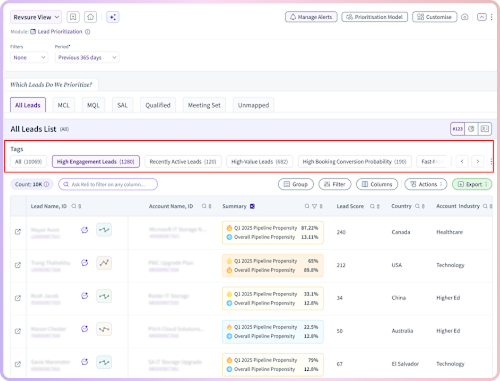
From raw signals to a shared revenue language
Custom Tags solve one of the most overlooked problems in revenue execution: misalignment in interpretation.
Marketing might interpret engagement as content consumption and form fills. Sales might interpret engagement as replies and meetings booked. RevOps might interpret engagement as multi-signal behavior patterns that correlate with conversion. Without an agreed definition, teams end up spending time debating whether a lead is truly qualified instead of taking action.
Custom Tags create a shared operational language for prioritization. A tag makes prioritization consistent, repeatable, and scalable because it travels with the record, not with tribal knowledge.
That consistency becomes even more important as teams grow. The larger the revenue org becomes, the more dangerous it is to rely on individual judgment alone. RevSure Custom Tags let you standardize what “priority” means without reducing your business to generic categories.
What makes RevSure Custom Tags different from “just another filter”
Filters are passive. Tags are directive. A filter helps you narrow down a list, but it doesn’t tell your team what the record represents or what action to take. With Custom Tags, prioritization becomes easier to operationalize because the tag itself can reflect intent and urgency.
Instead of scanning multiple columns and interpreting each signal manually, reps can focus on the output: the tag. The tag becomes the summary your team trusts, an at-a-glance answer to “what’s happening here?”
That speed matters because prioritization isn’t a one-time task. It’s a constant workflow. Every day, new leads come in, opportunities evolve, accounts heat up, and engagement shifts. RevSure Custom Tags allow your team to keep up with those changes without slowing down.
Where RevSure Custom Tags work in RevSure
Custom Tags are available across RevSure’s core prioritization surfaces so you can bring consistent definitions everywhere your team makes decisions.
- Lead Prioritization: tag the right prospects for quick action and tighter response times
- Opportunity Prioritization: identify momentum, risk, and focus areas inside the pipeline
- Account Prioritization: surface accounts showing heat, expansion potential, or early buying signals
By supporting all three layers, RevSure Custom Tags help your revenue org stay aligned across the full buyer journey, from first signal to closed won to expansion.
Common Custom Tags revenue teams love (and why)
Here are a few practical ways teams typically use RevSure Custom Tags inside prioritization workflows:
- High Engagement
This tag is ideal when a lead or account is showing consistent engagement signals over a short period of time. It creates a clean “follow up now” list for SDRs and AEs and helps teams respond while attention is still high. - Fast Moving
This tag highlights opportunities that are progressing with momentum. It helps reps double down on deals that are advancing and helps managers see which pipeline is truly real, not just sitting in a stage. - Warm Account
This tag is perfect for accounts that aren’t quite ready to convert but are showing early indicators. It creates a middle layer between “cold outbound” and “sales-ready,” which is where many teams win or lose pipeline generation. - At Risk / Stalled
This tag identifies pipeline that needs intervention. It’s especially useful for forecasting accuracy and proactive deal recovery because it surfaces risk early — before it becomes an end-of-quarter surprise.
How RevSure Custom Tags improve day-to-day execution
RevSure Custom Tags don’t just improve visibility; they improve behavior. They help SDRs prioritize outreach with confidence instead of guessing. They help AEs spend time on deals that are moving and intervene in deals that are slipping. They help RevOps scale best practices across teams by embedding definitions into the system, not into training documents.
Most importantly, they turn prioritization into a repeatable system instead of an individual skill. That shift is what separates “good reps who figure it out” from “good teams that execute consistently.”
RevSure Custom Tags create immediate value in two core revenue moments:
- Daily prioritization: reps can start the day with a focused, trusted list of what matters most
- Pipeline and account reviews: managers can quickly see patterns like momentum, risk, and engagement without spending time decoding metrics
When everyone sees the same tag and interprets it the same way, execution becomes faster and cleaner, and teams spend less time debating what’s urgent.
Start building prioritization that matches your business
RevSure’s mission is to help revenue teams act on the right signals at the right time. Custom Tags are a natural evolution of that mission, because they empower you to define what “right” means for your organization.
If you’re ready to move beyond generic system signals and create prioritization logic that mirrors your actual operating model, RevSure Custom Tags are now live in Lead, Opportunity, and Account Prioritization modules.
Bring your best revenue definitions into the product. Make them visible to everyone. And turn prioritization into action at scale.