Demystify
buyer journeys
from dark
social to the
deep funnel
Trace every B2B buyer journey across marketing, sales, and offline touchpoints, then see the paths that create pipeline.
Customer journey analysis maps the complete sequence of interactions that moves a buyer from first signal to revenue. Built on RevSure's Context Layer, it resolves people, accounts, and opportunities so teams can study the paths that actually created pipeline.
From connected data to the next best move
A complete, governed view gives every team the same evidence before they act.
- 01
Capture each signal
Connect web, campaign, event, CRM, sales, and product signals.
- 02
Stitch the path
Resolve anonymous activity, people, accounts, and opportunities into one journey.
- 03
Find the patterns
Compare the sequences that advance buyers with those that stall.
- 04
Act on evidence
Use the journey to refine campaigns, handoffs, and investment.
The signal is there. It is just disconnected
When teams work from fragmented data, important changes become visible only after the opportunity to act has passed.
Models, not paths
Attribution gives a credit total without showing the sequence that earned it.
Journeys in pieces
Marketing, sales, and product activity live in separate tools.
Handoffs go dark
Teams cannot see where a buyer slowed between stages.
Busy is not effective
Activity volume obscures the touches that truly move buyers.
Analyze buyer journeys end to end
Compare the paths buyers actually take from MQL to opportunity, including sequence, conversion rate, cycle time, and touchpoints. Spot where buyers gain or lose momentum.
- Top journeys ranked by leads, opportunities, and cycle time
- Pick your own start and end stages, events, and touch types
- Filter by segment, region, channel, or source
- Follow buyers through SDR, BDR, and sales motions

Drill into every journey and every lead
Open any journey to see the leads, accounts, and engagement history behind it. The path stays connected to the records your team already knows, so friction is easy to investigate.
- Every lead behind a journey, with current stage
- Step counts, engagement patterns, and progression mechanics
- Full touch-by-touch history for each lead
- Traces back to source records, not a black box

Identify the touches that move buyers
Find which campaigns and interactions appear in journeys that progress, then compare their lift against buyers who were not exposed. Focus the next investment on evidence.
- Rank webinars, site visits, content downloads, and more by progression
- Compare journeys exposed to a touch against those that were not
- See the content assets and pages that contribute to movement
- First-touch, last-touch, or any-touch views

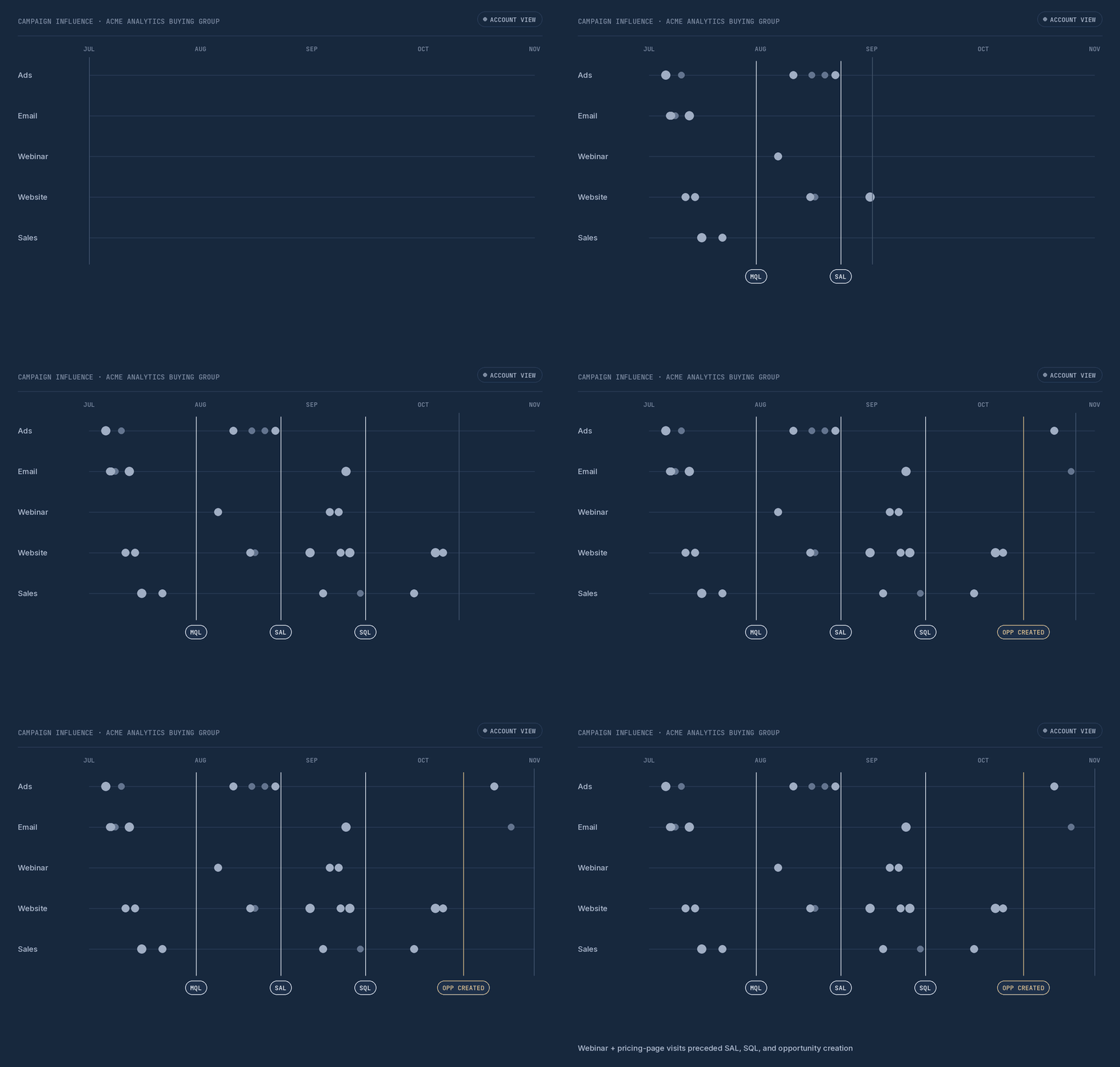
Map campaign influence across the full journey
Read the journey as a complete account timeline, including marketing, web, event, and sales moments alongside funnel milestones. See what preceded every move.
- Lead and account timelines, lane by channel
- Funnel milestones plotted against the touches before them
- Drill into any touchpoint to see its contribution
- Evidence for what accelerates pipeline, not a hunch
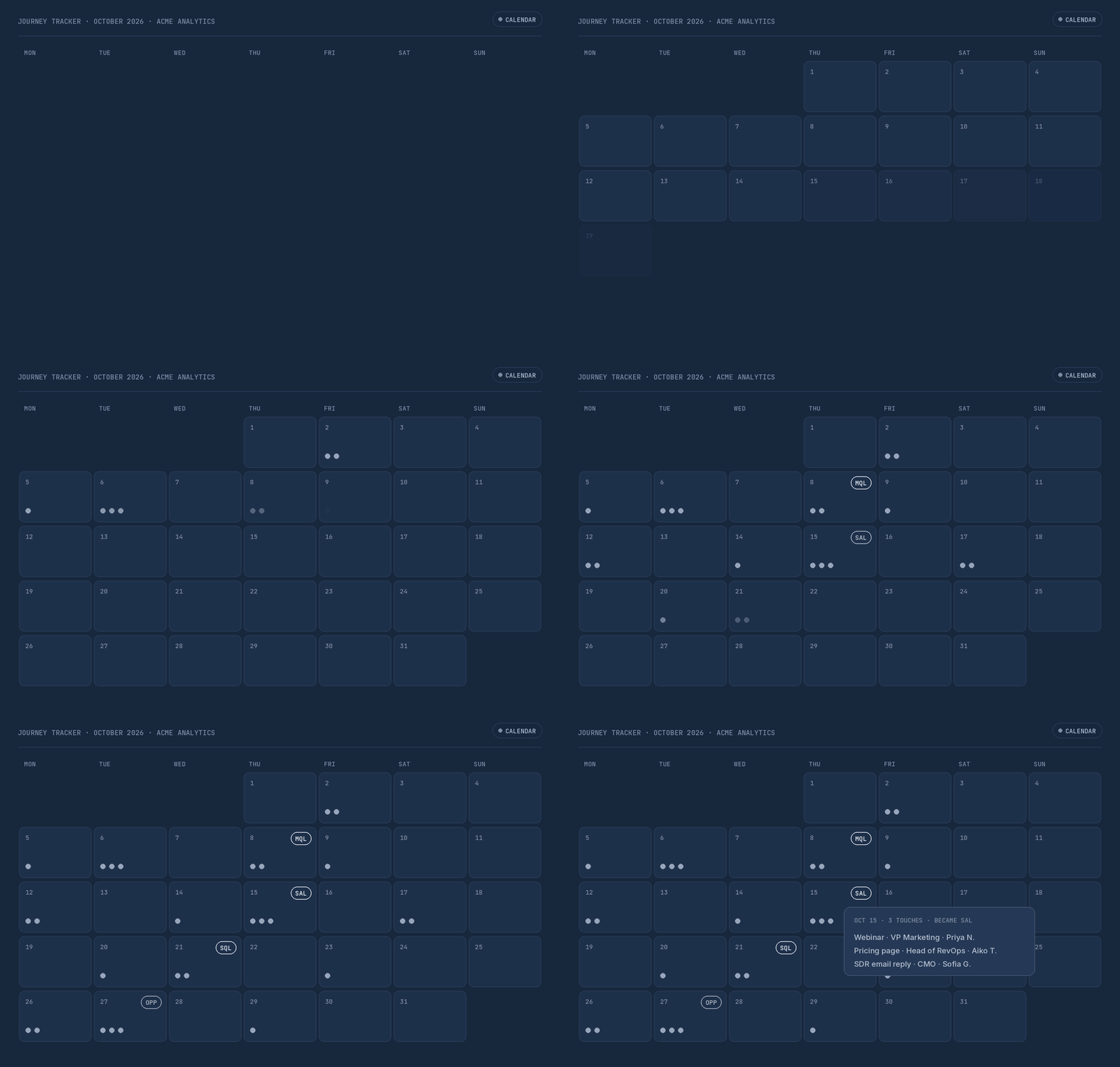
Read the journey like a calendar
See the moments that accumulate across a buying group and identify the days or weeks where momentum changed, with the people behind every signal.
- Day-by-day view of touches and milestones
- Open any date to see who engaged and through which channel
- Persona-level detail across the buying group
- See how each touch contributed to conversion or deal progress
Dive deeper into your KPIs
Build team-specific views of journey progression, conversion, and pipeline impact, then schedule a snapshot for stakeholders without relying on the data team.
- Build reports on the full data set and define your own metrics and dimensions
- Split dashboards by team, segment, channel, or persona
- Get shareable snapshots in your inbox daily, weekly, or monthly

Intelligence your team can actually use
One context layer
Every insight starts from the same resolved data across your GTM stack.
Evidence behind the answer
Each decision stays connected to the records, signals, and movement behind it.
Built to act
Insights reach the systems and owners who can turn them into better outcomes.
See customer journey analysis in action
Questions, answered
What is customer journey analysis?
Customer journey analysis maps the interactions a buyer or buying group has across channels and stages, then identifies which sequences are associated with conversion, velocity, and pipeline.
How is journey analysis different from multi-touch attribution?
Attribution distributes credit across touches. Journey analysis shows the ordered path, timing, and handoffs behind those touches, so teams can see how a buyer moved.
Can I analyze journeys for accounts and buying groups?
Yes. RevSure resolves contacts, accounts, and opportunities so teams can analyze an account-level buying journey rather than only a single lead history.
What data does RevSure use to map B2B buyer journeys?
RevSure connects web activity, campaign engagement, events, CRM records, sales activity, and product signals on one identity-resolved context layer.
How do I find which campaigns move leads to SQL or opportunity?
Compare journeys that progressed with those that stalled, then identify the campaigns and touchpoints associated with stronger conversion and velocity.
Do I need a data team to build journey reports?
No. Teams can build, filter, and share journey analysis views without a BI ticket, using the same governed data behind every funnel report.
See every moment that moves revenue forward..
Bring the full buyer journey into one view your teams can act on.