September 2026 Product Release: Skills Hub, Org Maps & GTM Planning
On this page
September advances RevSure’s vision of an AI-powered GTM operating system by making repeatable GTM intelligence easier to build, share, and act on. This release introduces the RevSure Skills Hub and new GTM Skills, expands Account Research with Org Maps, and enhances RevSure Canvas with continued analysis and artifact versioning. Alongside these AI capabilities, we’ve strengthened planning and measurement with the Pipeline Target Planner, DGE Targets, and Net ROI metrics, while adding richer collaboration, drilldowns, flexible analysis, and permission controls to help GTM teams move from insight to action with greater speed and confidence.
RevSure Skills Hub
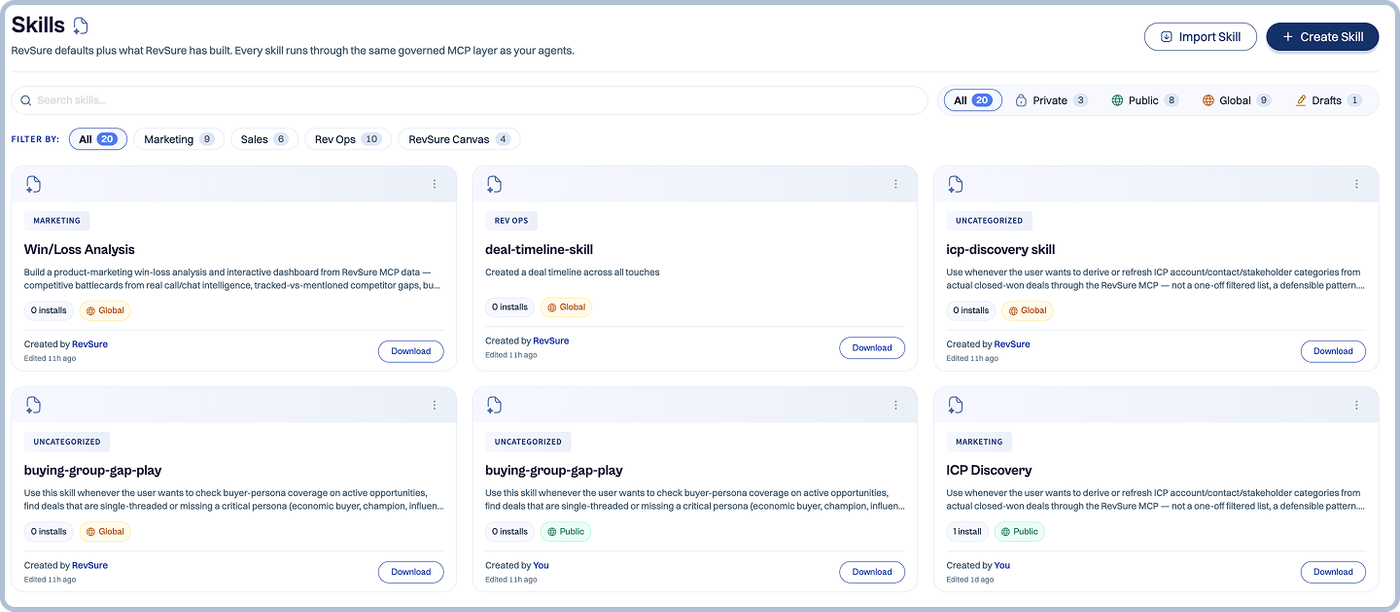
The Skills Hub is the org-wide home for GTM skills that run on the RevSure MCP across platforms like Claude and ChatGPT.
Teams can now:
- Create: Build a skill (SKILL.md plus a demo artifact) for any repeatable GTM workflow.
- Import: Bring in existing .skill files so proven plays don’t get rebuilt.
- Share: Publish skills to your org so everyone runs the same vetted play.
RevSure GTM Skills
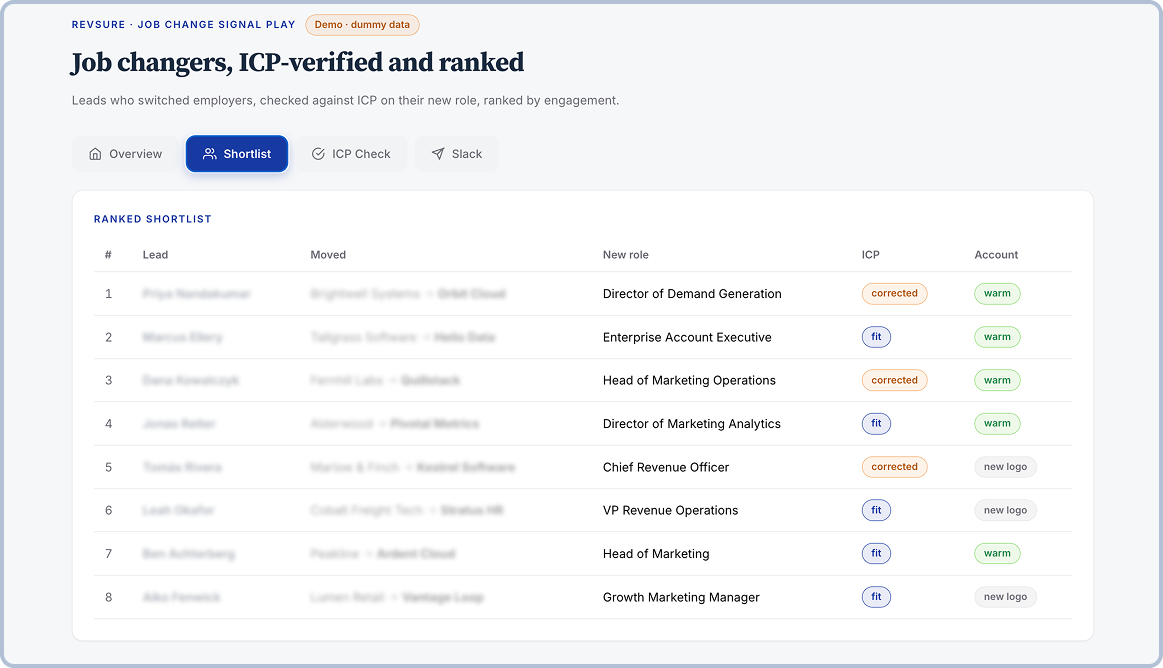
Job Change Signal Play. Finds leads who moved to a new company, filters to ICP fit using RevSure GTM signals, and ranks them by real engagement—not raw touch count. Hands the shortlist off to Slack.
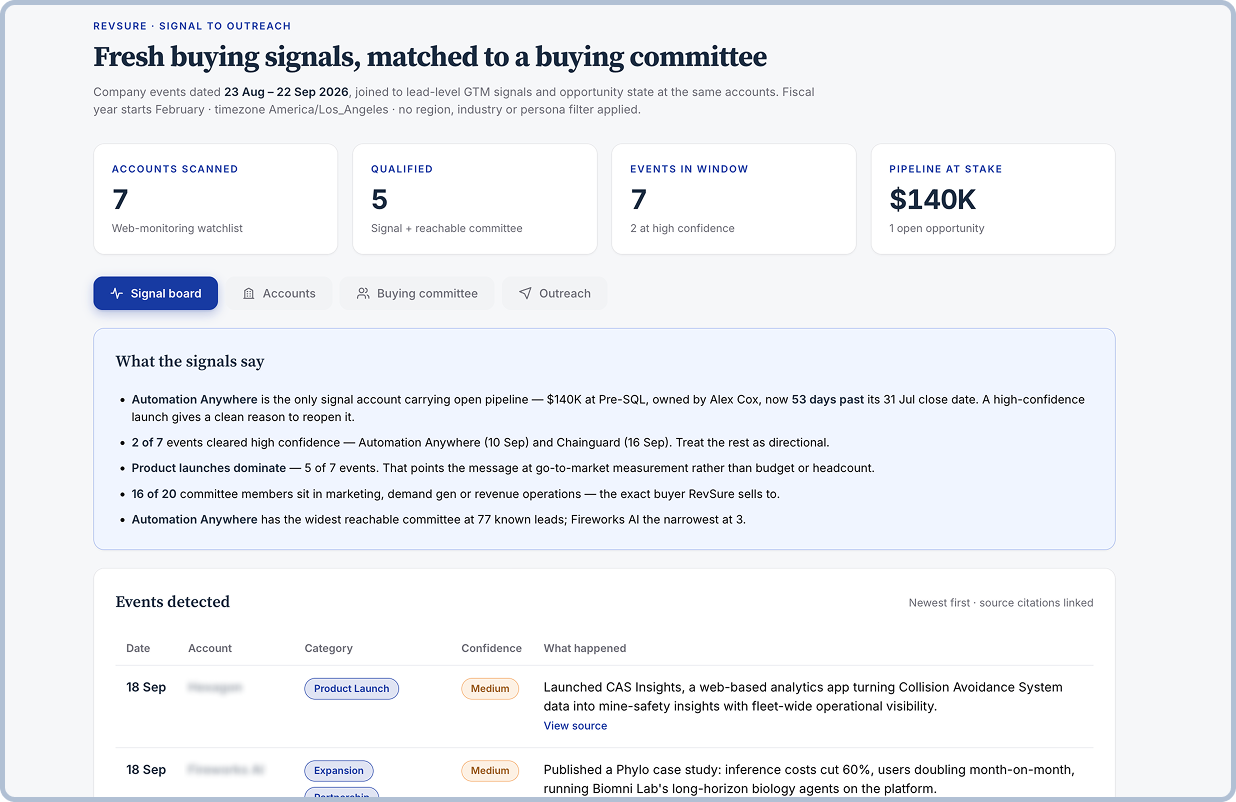
Signal-to-Outreach. Starts from a fresh event—company news, web or intent activity, or GTM engagement signals—filters to accounts and people worth acting on, then drafts outreach grounded in the actual signal.
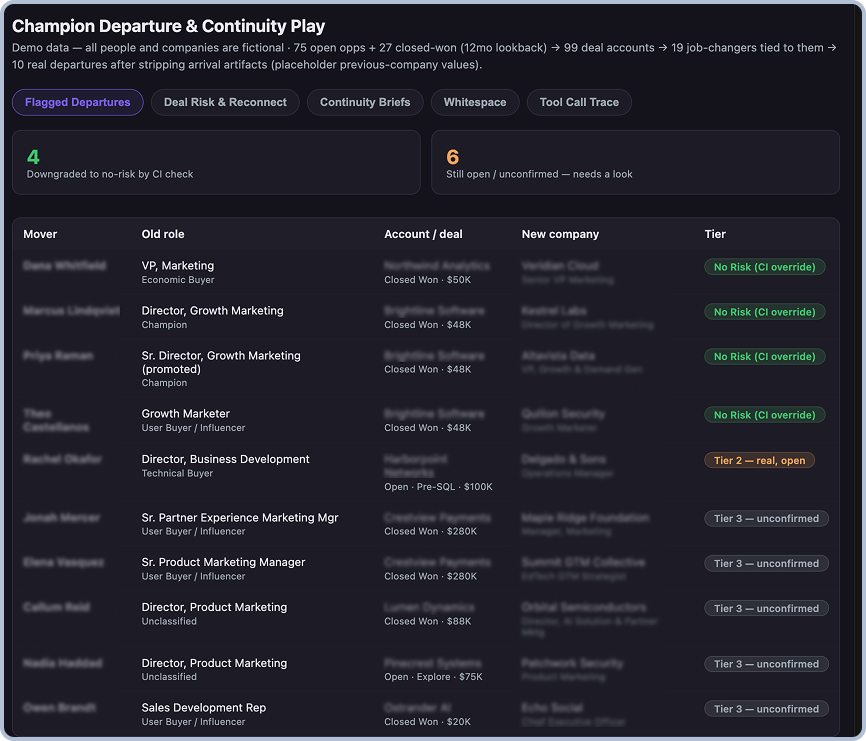
Champion Departure & Continuity Play. Scans open pipeline and recently closed-won accounts for champions who changed jobs. Cross-checks conversation intelligence and MEDDPICC signals before flagging deal risk, drafts reconnect emails and continuity briefs, and can turn the champion’s move into whitespace at their new company.
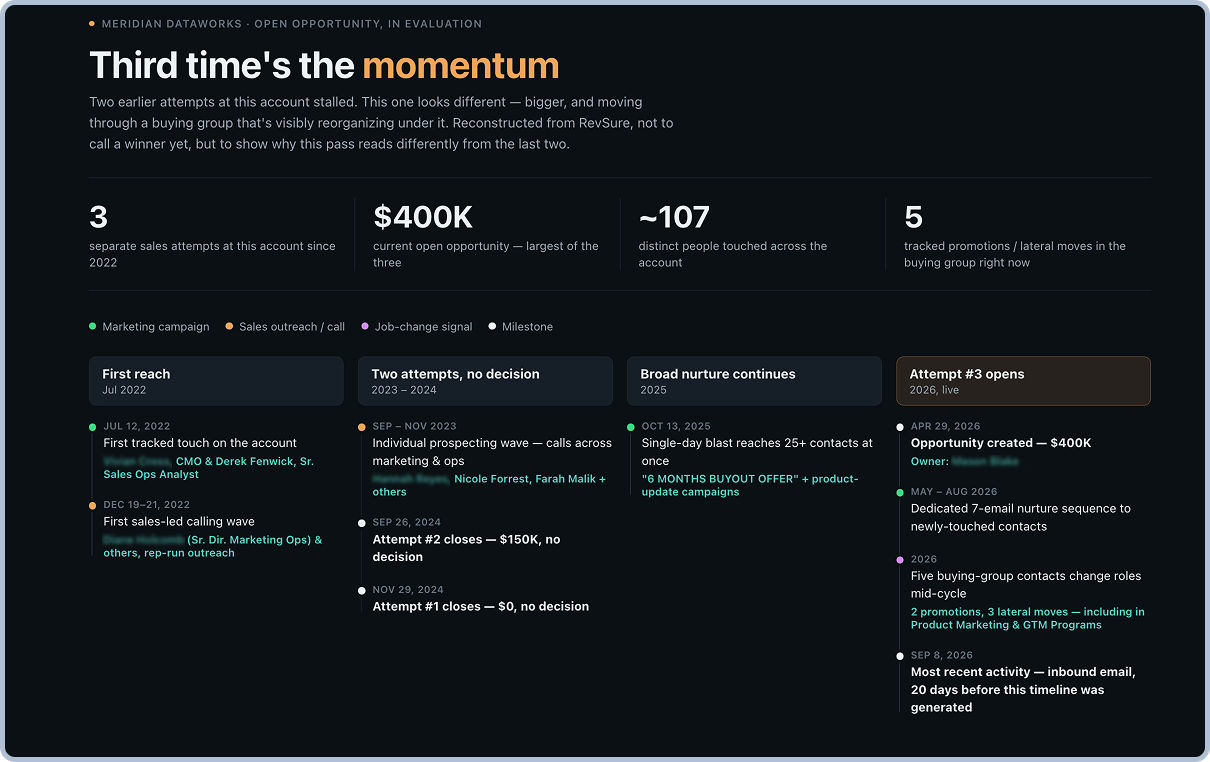
Deal Timeline Storyline. Turns any opportunity into a shareable timeline artifact, built purely on RevSure MCP data and proven against live tenant data.
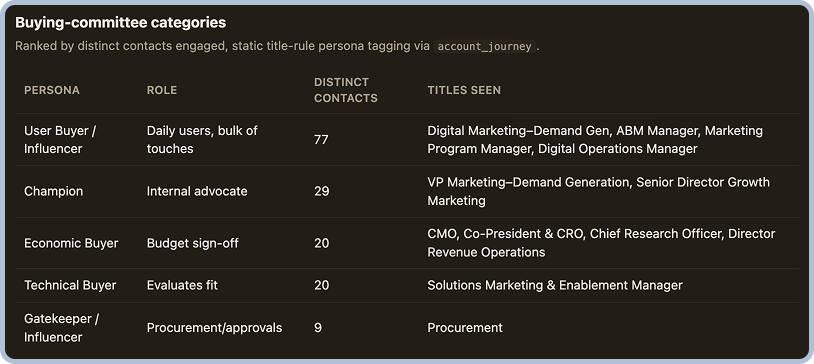
ICP Analysis. Runs analysis against closed-won deals and pipeline to understand your ICP at a granular level across contacts and accounts. The skill layers external signals with internal context across engagements to show the categories of contacts and accounts that convert best.
RevSure Account Research: Org Map
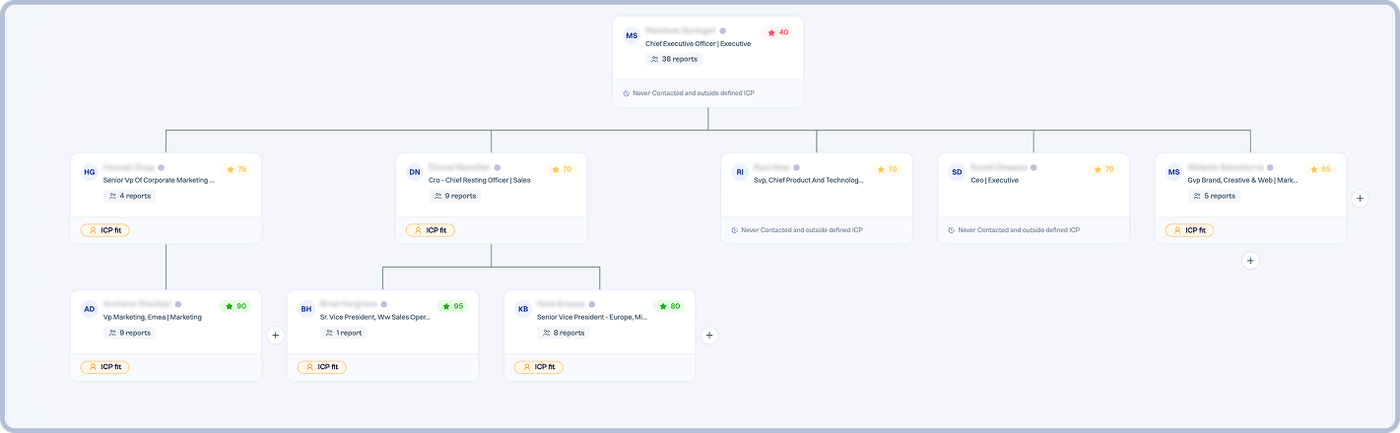
The Account Research agent now includes an Org Map. It builds the org hierarchy automatically from contacts and titles, so you can see who actually sits where in the buying org.
How it works
- Uses title, seniority, and function taxonomy to place each contact in the hierarchy.
- Scores each contact on these criteria and ICP fit.
At a glance, each contact shows
- Engaged vs. non-engaged
- ICP vs. non-ICP
- Buyer persona
Why it matters
- Spot coverage gaps and single-threaded accounts in seconds.
- See where engagement is concentrated and where it’s missing.
- Prioritize outreach to the right people, not just the loudest ones.
RevSure Canvas: Continue in New Chat & Artifact Versioning
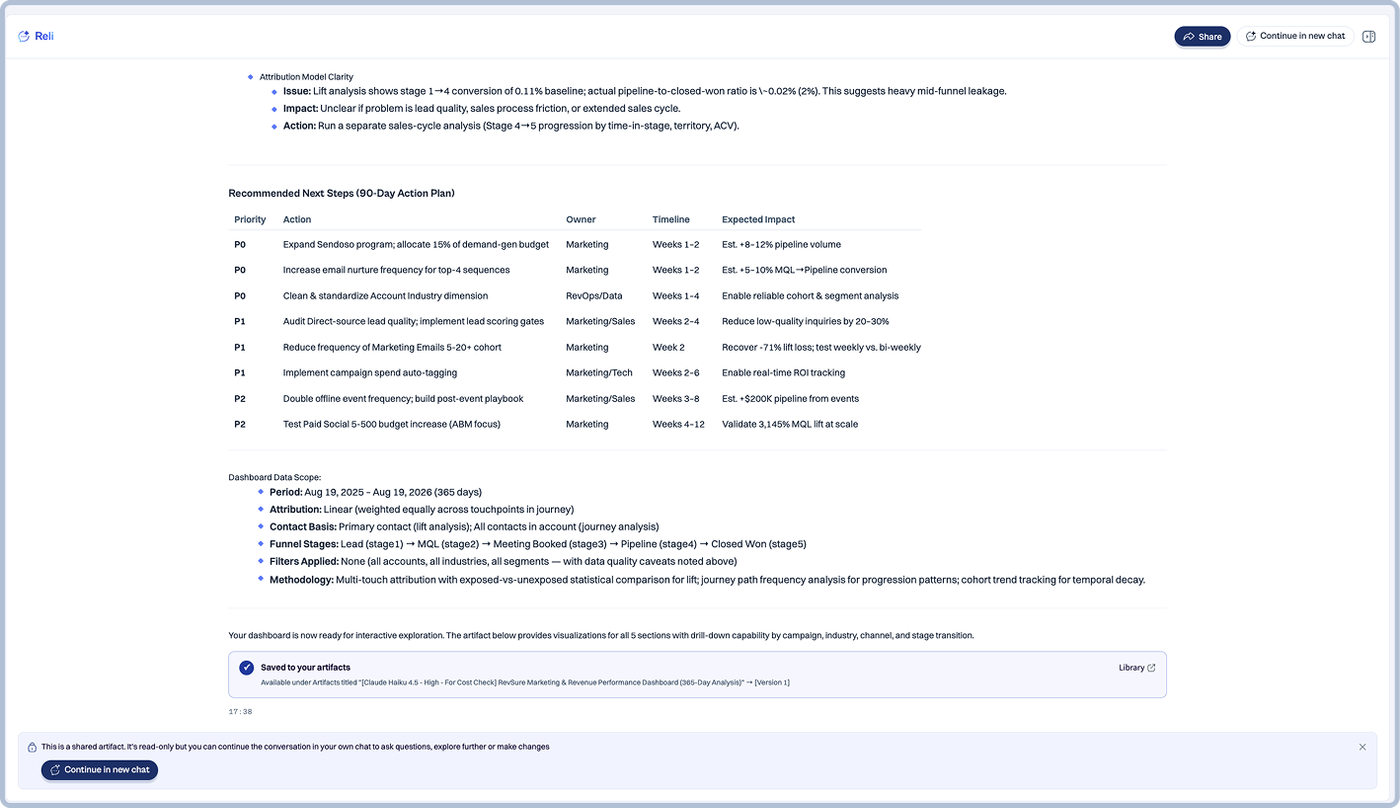
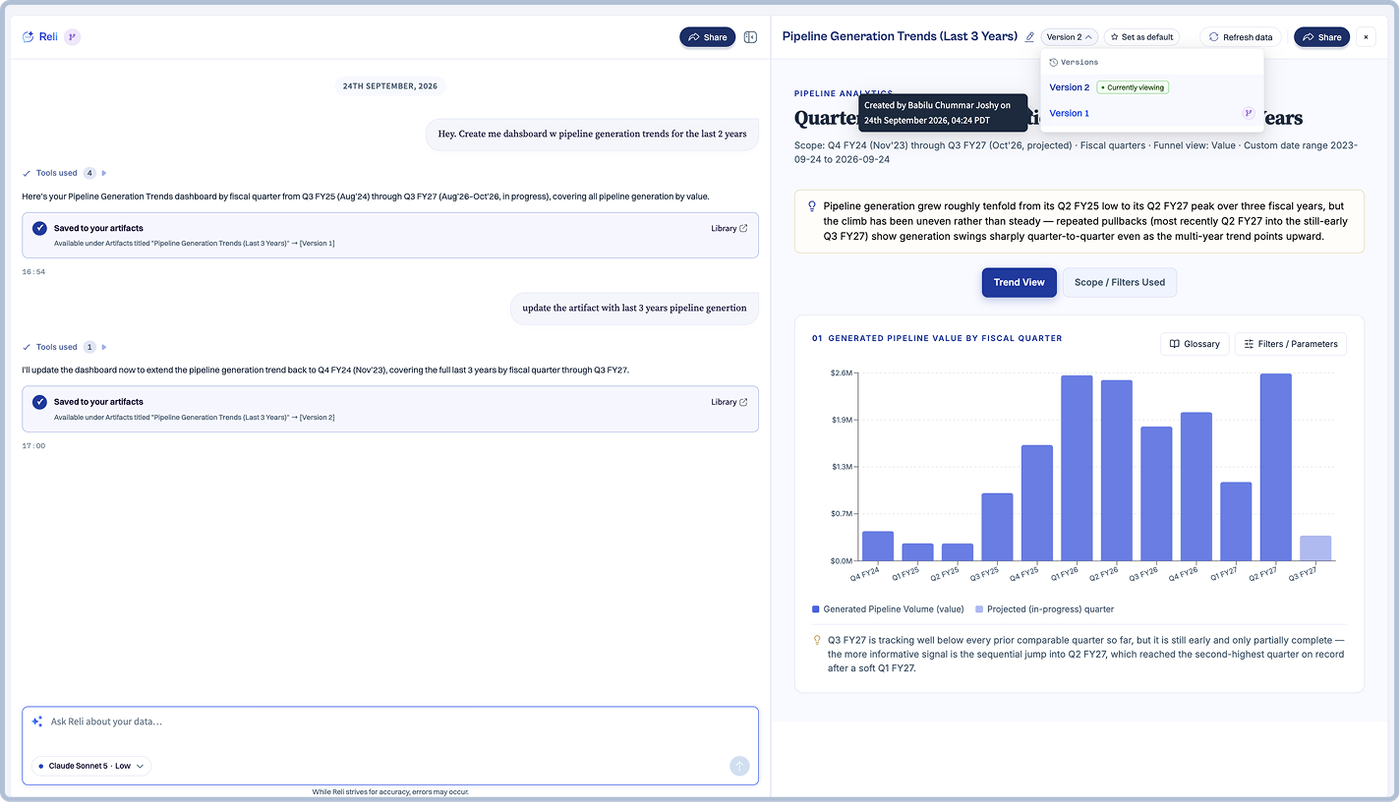
RevSure Canvas now makes it easier to build on existing analysis while preserving the original work. Users can continue from an existing shared chat or artifact in a new, independent conversation that retains the original context, allowing them to explore different questions or directions without changing the source analysis. Artifact Versioning also preserves previous versions as an artifact is updated, making it easier to review how the analysis has evolved over time.
Target in DGE Trend View
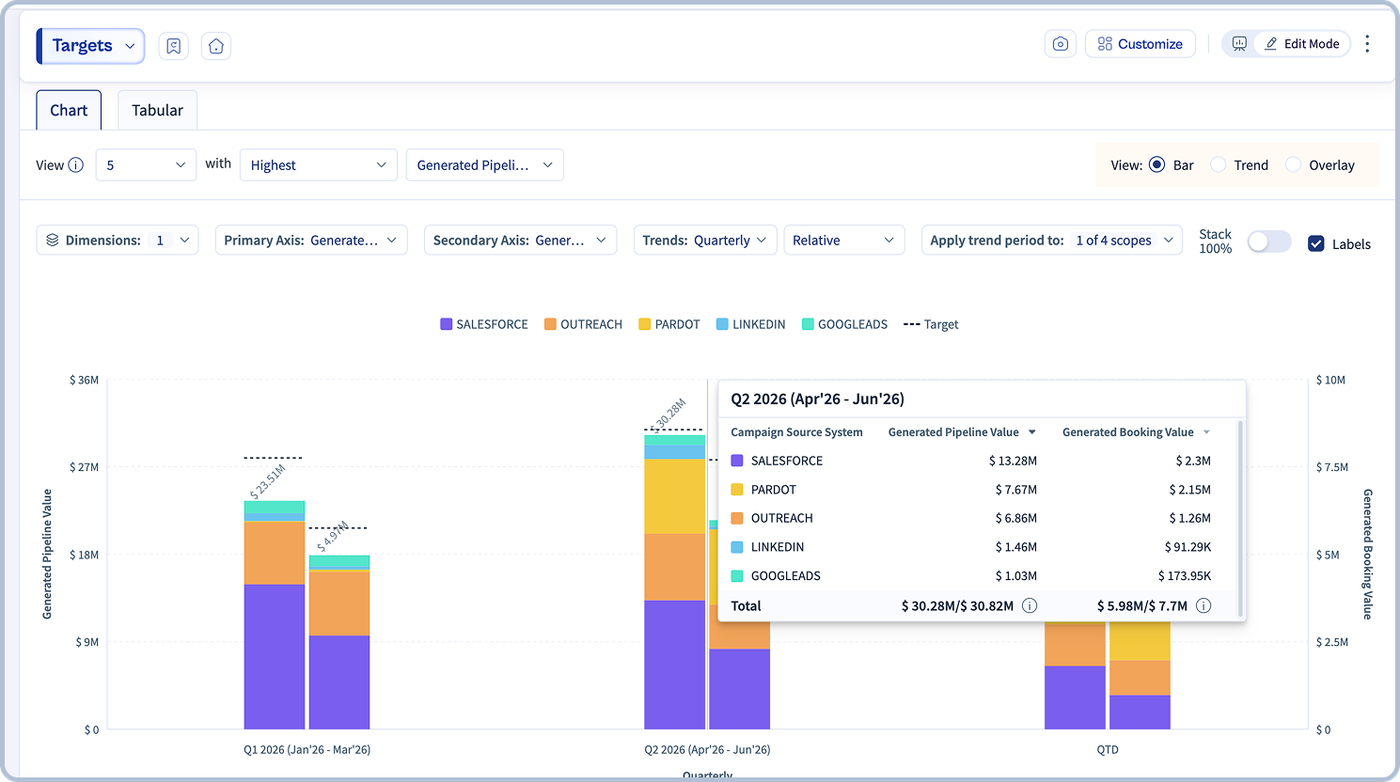
The Demand Generation Effectiveness (DGE) Trend View now supports targets, allowing users to compare actual funnel performance against defined goals directly within the trend view. This makes it easier to identify periods where performance is above or below plan and track actual results against business targets in a single view.
Notes in Widgets
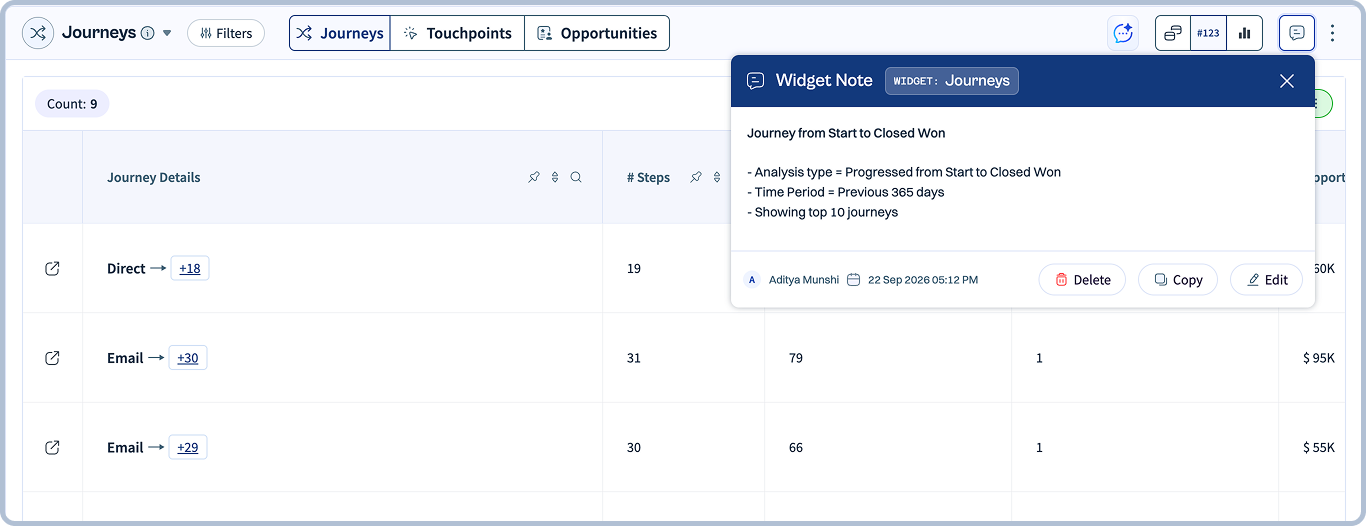
RevSure now lets users add notes directly to widgets, making it easier to capture and share important context alongside the analysis. Document the logic behind a widget, applied filters, assumptions, key observations, or anything teammates should know when reviewing the data.
By keeping this context within the widget itself, teams can better understand how an analysis was configured and why, reducing back-and-forth and making dashboards easier to collaborate on and revisit over time.
Pipeline Target Planner Widget
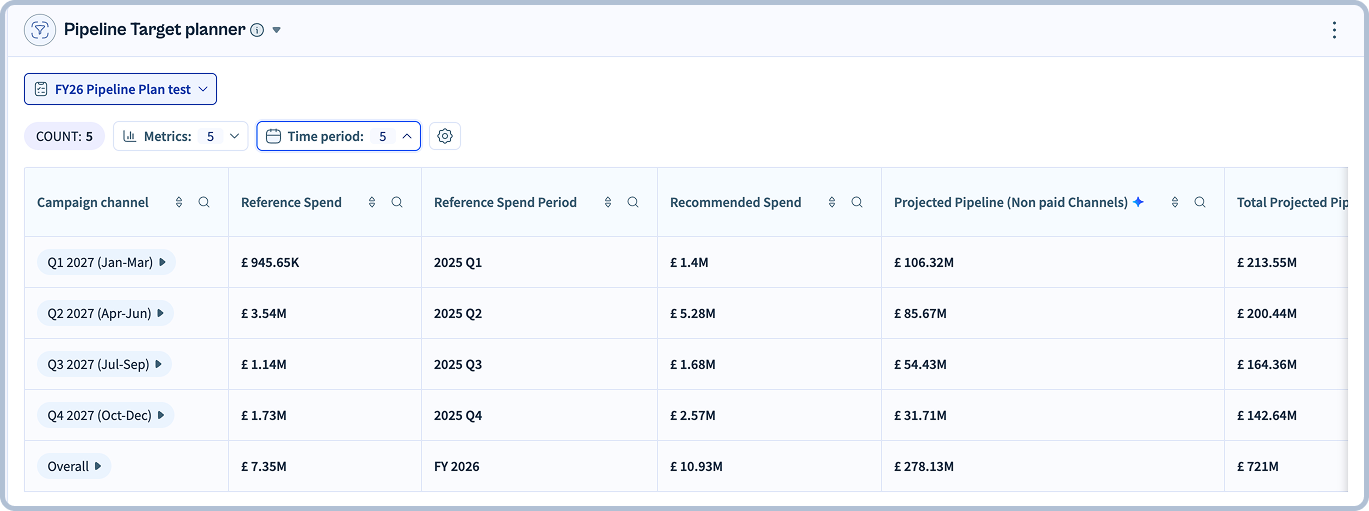
RevSure introduces the Pipeline Target Planner, helping marketing and demand generation teams determine how to allocate spend across paid channels to achieve their pipeline or booking targets. Using historical performance and MMx response curves, the planner recommends a practical channel-level spend mix while accounting for expected contributions from both paid and non-paid channels.
By turning a quarterly or annual target into actionable spend recommendations, teams can move from “what is our target?” to “how should we allocate our budget to get there?”, making budget planning more data-driven, efficient, and aligned with pipeline goals.
Enhancements
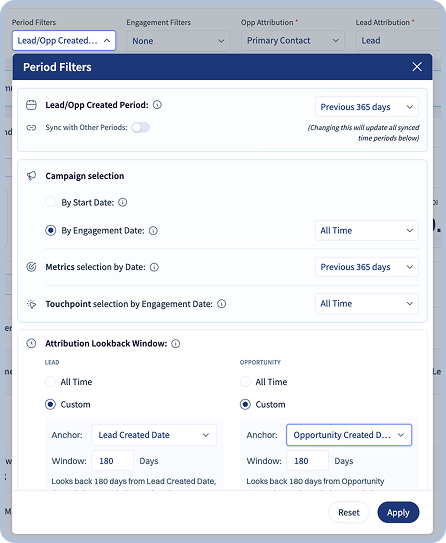
DGE Period Filter: Custom Lookback Window for Stage & Created Dates
DGE now provides greater flexibility in defining the lookback window used for analysis by allowing users to configure custom periods based on Created Date and Stage or Progressed Date. This helps teams align cohort and funnel analysis more closely with the business period being evaluated, particularly when stage progression occurs well after the original record creation date.
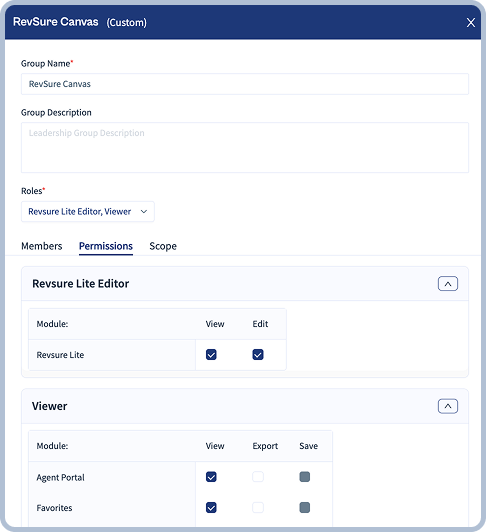
Permissions: New RevSure Canvas Role in Group Permissions
A dedicated RevSure Canvas role is now available within Group Permissions, allowing administrators to manage Canvas access independently from the broader RevSure application. Canvas permissions can now be assigned at the group level, making it easier to provide the appropriate level of access to different user groups while keeping permission management centralized.
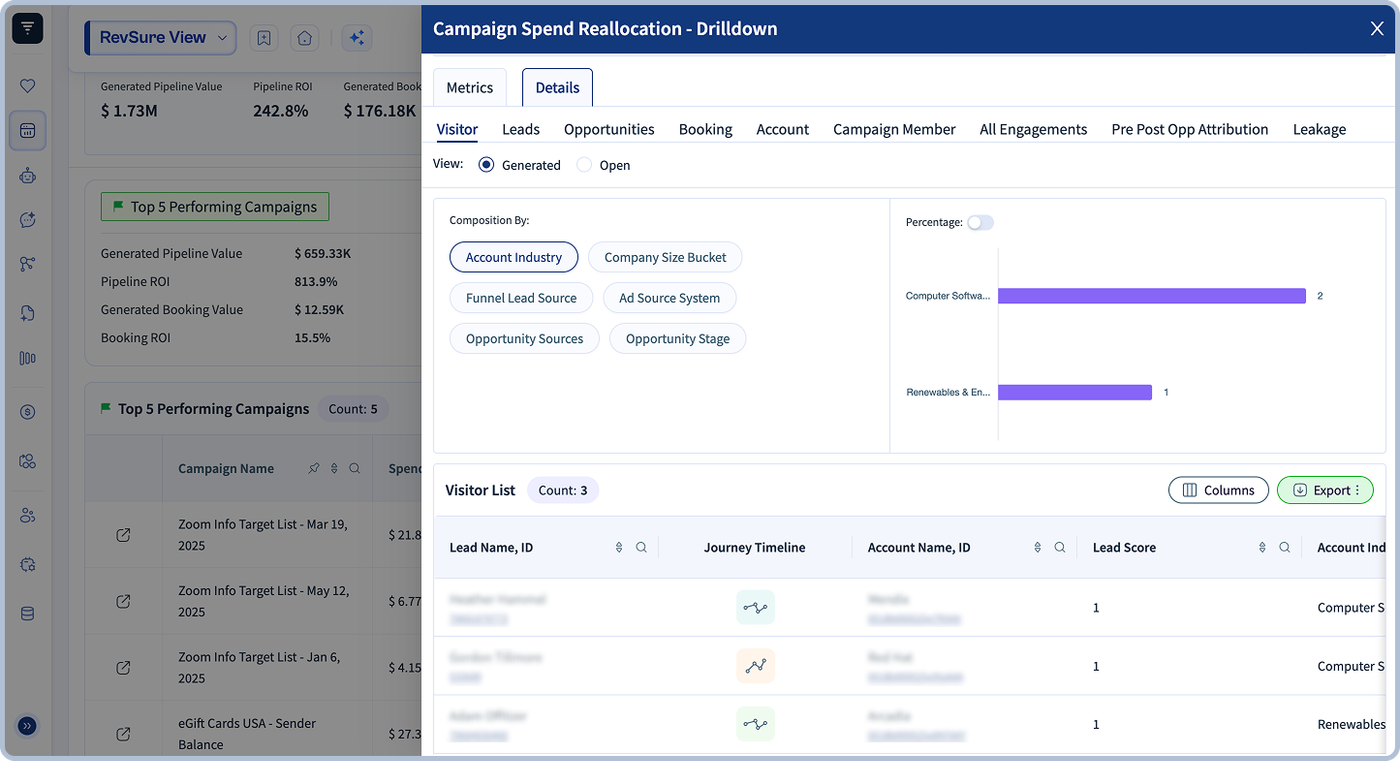
Side Panel Drilldowns in Campaign Reallocation
RevSure now brings Side Panel Drilldowns to the Campaign Reallocation widget, enabling GTM teams to explore the underlying campaign records behind reallocation insights without leaving the current analysis. Users can drill directly into the data behind each recommendation to better understand the campaigns contributing to the results.
This enhancement adds deeper record-level visibility to campaign reallocation workflows, helping Marketing and RevOps teams validate recommendations, understand the drivers behind suggested budget shifts, and make more informed campaign investment decisions with greater confidence.
Net ROI Metrics
RevSure has introduced Net Pipeline ROI and Net Booking ROI to provide a clearer view of marketing returns after accounting for spend. These metrics measure the net return relative to investment using (Generated Pipeline/Booking Value − Spend) ÷ Spend.
With these additions, teams can go beyond understanding how much pipeline or bookings were generated per dollar spent and evaluate the actual net return on their marketing investment, enabling more informed performance and budget decisions.