On this page
The short version
Claude connectors are integrations that let Claude read data from, and take actions in, the apps a team already uses, through the Model Context Protocol (MCP). RevSure, the agentic GTM platform whose Digital Workers run on the Full Funnel Data Graph, exposes its governed context layer to Claude as one MCP connector. This guide covers how connectors work, which ones GTM teams add, and how to set them up safely.
A marketing operations lead at a cybersecurity software company we work with spent most of her thursday morning asking Claude to build a marketing forecast. Because a new growth executive asked a fair question: if a region is short on pipeline this month, what does marketing have coming that closes the gap? The answer lived in four places, a Salesforce org, a Looker dashboard, a Monday.com board and a spreadsheet of targets, and Claude was working through each of them in turn.
"There's one point I waited like 45 minutes," the ops lead told RevSure. Shortly after, the claude account hit its usage limit.
A few minutes later, her colleague pointed out that the company's RevSure MCP connection to Claude had been approved about a week and a half earlier, so she used that instead. Claude could have been reading the CRM and marketing data from one governed source, with accounts and definitions already resolved, instead of reconciling raw exports inside a chat window.
This is a fair picture of where most revenue teams are with Claude connectors. The connectors work. The trouble starts when a question needs more than one system to agree.
What is a Claude connector?
A Claude connector is an integration that gives Claude access to an outside app or data source. In Anthropic's words, connectors "let Claude access your apps and services, retrieve your data, and take actions within connected services" (Claude Help Center).
Under the hood, most connectors are MCP servers. The Model Context Protocol is an open standard for exposing tools and data to AI models, so a connector is a remote MCP server that Claude knows how to call. There are two ways to add one:
- Directory connectors. Prebuilt connectors published by the software vendor. You pick one from Claude's connector directory, click Connect and sign in. HubSpot, for example, publishes its own connector for Claude.
- Custom connectors. Any remote MCP server added by URL. In Claude you go to Customize, then Connectors, choose Add, then Custom, enter a name and the server's URL, and configure sign-in. Anthropic lists custom connectors on Free, Pro, Max, Team and Enterprise plans, with Free users limited to one.
Two rules from Anthropic's documentation matter most to a GTM team. First, Claude inherits the permissions of the person using it: a rep who cannot see an opportunity in the CRM will not see it through Claude either. Second, on Team and Enterprise plans an Owner or Primary Owner has to enable connectors for the organisation before anyone can use them, and each person still signs in to each service separately.
Which connectors do sales and marketing teams add first?
The first connectors a revenue team adds tend to follow the systems people already open every morning:
- CRM: opportunities, accounts, contacts, stages and close dates.
- Marketing automation: programs, campaign membership, lead status and form fills.
- Ad platforms: spend, impressions and clicks by campaign.
- Call recording and email: what was said and promised on deals.
- Docs and spreadsheets: targets, territory plans, board decks.
- The warehouse: whatever the data team has modelled.
Each of these answers questions about itself well. Ask a CRM connector for every open opportunity over $100K closing this quarter and it returns a clean list. Ask an ad platform connector what a campaign spent last month and you get the number.
Why does one connector per tool break on pipeline questions?
The questions that matter to a CMO, a CRO or a RevOps lead are rarely single-system questions. "Which campaigns sourced the pipeline we closed last quarter?" needs the ad platform, marketing automation and the CRM to agree on who is who, what counts as sourced, and when each touch happened. With one connector per tool, Claude has to work all of that out inside a conversation, every time, and three problems show up.
Identity does not line up. Marketing automation knows a lead by email address. The CRM knows a contact attached to an account. The ad platform knows a company from a matched audience, and the call recorder knows a meeting attendee's name. Joining those four views of one buyer is the hardest part of GTM data work, and a chat session has to redo it from raw records on every question, without the matching rules a data team would apply.
Definitions differ by system. An MQL in marketing automation, a sales-accepted lead in the CRM and a "qualified" stage in a dashboard can each describe a different set of records. Claude will answer from whichever definition the data it pulled happens to carry. Two people asking the same question on different days can get two different numbers, and both look authoritative.
Time gets flattened. Most connectors return current state: the stage an opportunity is in now, the owner it has now. Pipeline questions are usually about change: when a deal entered a stage, which touches came before it, what the forecast looked like on the first of the month. Unless the connector exposes history, Claude cannot reconstruct it.
The 45-minute wait in the opening story is what this looks like from the user's chair. Claude was pulling large exports from several systems, holding them in context and trying to reconcile them, which is slow, expensive in usage, and still leaves the matching rules to a model's best guess.
How do you connect Claude to a GTM context layer instead?
The alternative is to put the joining work underneath Claude, where it is done once and governed, and give Claude a single connector to the result. That is what a GTM context layer is for. RevSure's context layer is built on the Full Funnel Data Graph: leads, contacts, accounts, campaigns, opportunities and their history, resolved to one identity across the CRM, marketing automation, ad platforms and the warehouse.
RevSure exposes that layer to Claude through its MCP server. The server is headless, meaning there is no separate RevSure screen to log into: the team keeps working in Claude, and the server supplies four kinds of tool: business context, resolved data, decision intelligence and governed actions.
Here is what that looks like in a real run. A user typed one request into Claude: research a target account and draft outreach. Claude called RevSure's tools 17 times, ran three RevSure agents and returned five outreach drafts, along with the fact that mattered most: the account had been acquired the previous November, which changed every angle worth taking.
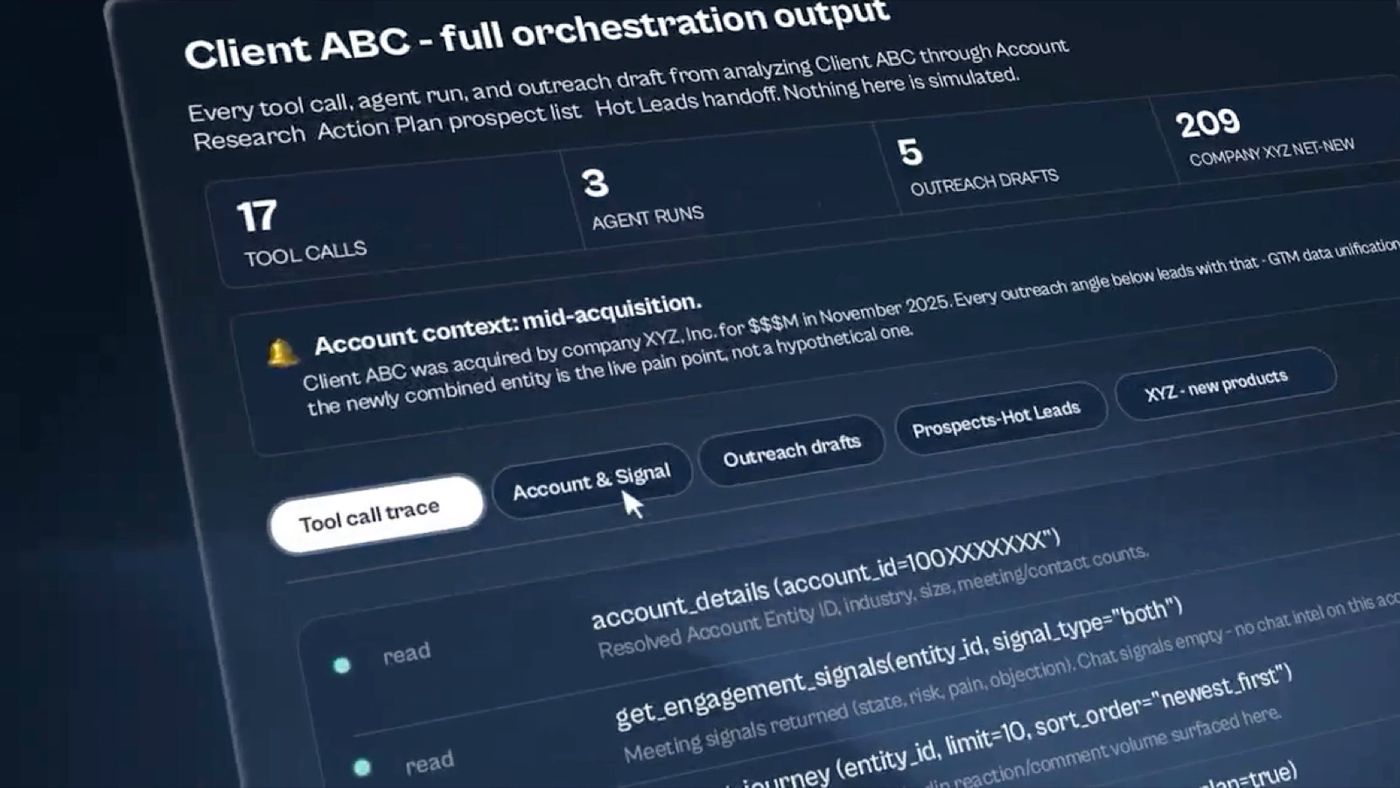
A live Account Research run in Claude over the RevSure MCP connector. Names are masked. Every row in the tool call trace is a read against the context layer: account details, engagement signals, the account journey and the contacts behind the deal.
The same pattern works for a lost-deal review. Asked to run RevSure's win-back play, Claude read every closed-lost opportunity in the tenant (774 of them in this run), pulled the loss reason and stakeholder map recorded on each shortlisted deal, checked whether each champion had changed jobs, and sized the buying group behind each deal.
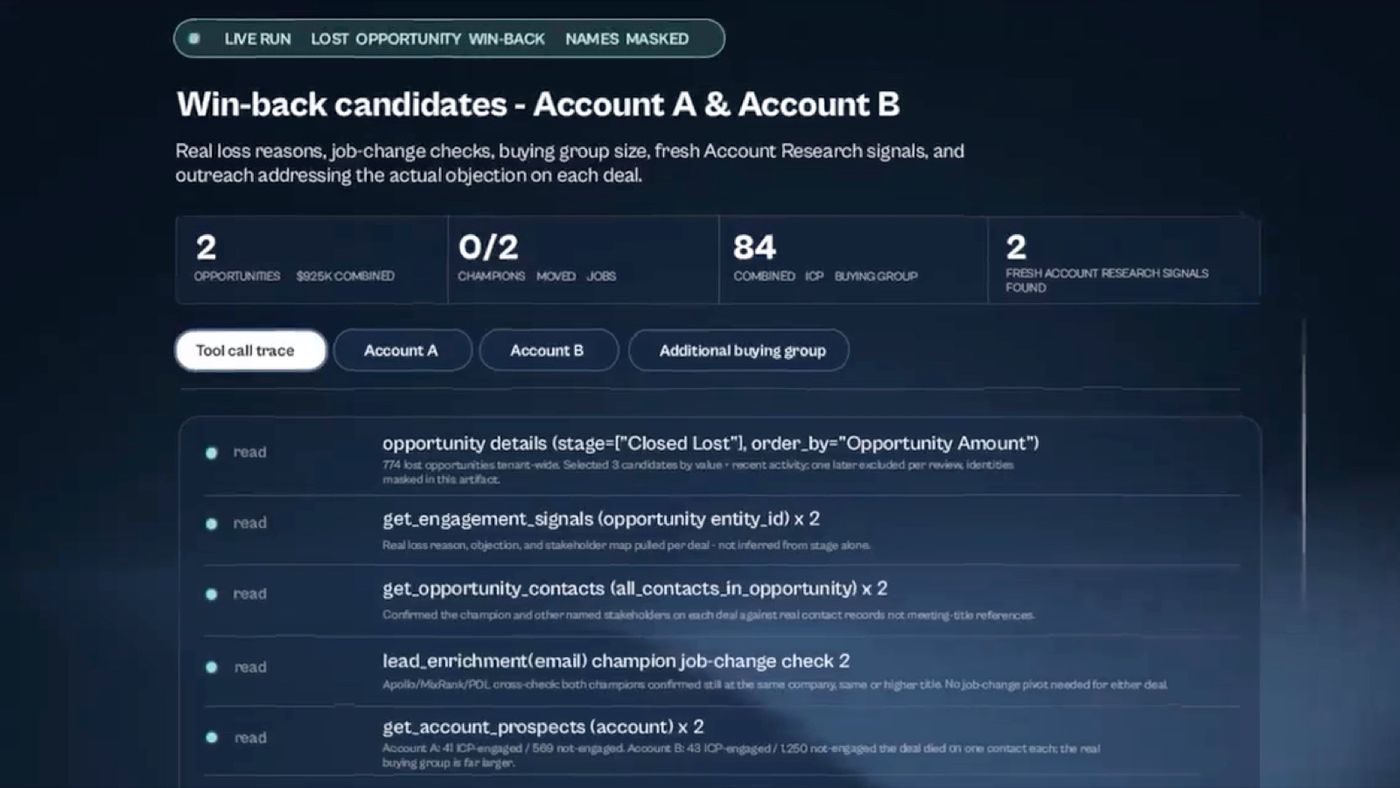
The win-back run's tool call trace. Two opportunities worth $925K combined were shortlisted, and in both cases the buying group on file was far larger than the single contact the deal had been worked through.
Neither run asked Claude to join exports. The identity matching, stage history and definitions were already in the context layer, so Claude spent its effort on the part a language model is good at: reading the evidence and writing something a person can act on.
Prompts GTM teams run through a Claude connector
The table below pairs common requests with the kind of RevSure tool that answers them. The tool names come from the runs shown above.
How to set up a Claude connector safely
The setup takes minutes. The decisions around it deserve more care, because a connector that can act can also act wrongly.
- Decide who owns the connection. On Team and Enterprise plans, connectors stay off until an Owner enables them, so agree internally who approves new connectors. In the opening story, the connection had been approved and the person who needed it did not know; a one-line note to the team would have saved a morning.
- Add the connector. For a directory connector, choose it from the directory and sign in. For a custom connector such as RevSure's, go to Customize, then Connectors, choose Add, then Custom, and enter the remote MCP server URL your vendor provides.
- Set tool permissions before anyone uses it. Owners can set each tool to "Always allow", "Needs approval" or "Blocked" across the organisation. A sensible default for GTM data: reads on Always allow, anything that writes to the CRM, sends outreach or changes an audience on Needs approval.
- Check what Claude can see. Claude inherits each user's permissions in the source system, so a connector never widens access. On RevSure's side, the MCP server applies its own role-based access, PII masking and an audit log of every call, set out in RevSure's MCP security practices.
- Test with questions you already know the answer to. Ask for last quarter's sourced pipeline by channel, or the open deals over a threshold, and compare with the number in your existing report. If they disagree, find out which definition each one uses before anyone builds on the answer.
What changes when Claude has the context
The ops lead from the opening story was doing reasonable work with the tools in front of them. Claude could reach every system; it just had to rebuild the company's GTM data model from scratch on every question, and the cost of that showed up as a 45-minute wait and an empty usage allowance.
Every connector a team adds widens what Claude can reach, and each one brings its own definition of a lead, an account and a stage for Claude to reconcile. With a context layer between those systems and Claude, the reconciling happens once, under rules the RevOps team can read, and the number Claude gives on Tuesday matches the one it gave on Monday. That is the number a CMO can take into a forecast call.
FAQs
What are Claude connectors?
Claude connectors are integrations that let Claude read data from, and take actions in, outside apps such as a CRM, marketing automation platform or data warehouse. Most are built on the Model Context Protocol. They can be added from Claude's connector directory or as custom connectors using a remote MCP server URL.
Can Claude connect to Salesforce or HubSpot?
Yes. CRM vendors publish connectors for Claude, and any CRM data exposed through an MCP server can be added as a custom connector. A CRM connector answers questions about the CRM well. Questions that also need marketing, ad or warehouse data work better through a connector to a GTM context layer that has already joined those sources.
Are Claude connectors secure for sales and marketing data?
Claude inherits each user's permissions in the source system, so it cannot show someone data they could not already see. Organisation owners can set every tool to Always allow, Needs approval or Blocked. Many teams allow reads and require approval for any action that writes to the CRM or sends outreach.
What is the difference between a Claude connector and an MCP server?
An MCP server is the service that exposes tools and data over the Model Context Protocol. A Claude connector is how Claude is set up to call one. Most Claude connectors are remote MCP servers, either listed in the directory or added by URL as custom connectors.
How does RevSure work with Claude?
RevSure exposes its governed context layer, built on the Full Funnel Data Graph, to Claude through the RevSure MCP server. Claude can then read resolved account, lead, campaign and opportunity data, run RevSure plays such as account research and lost-deal win-back, and trigger actions behind approval, without a separate RevSure login.